Hear about the spike from Compethic, not from the queue.
Compethic watches every new signal for issues that are rising, new, or hitting critical customers, and tells the right people in Slack, Teams or email, with the evidence attached.
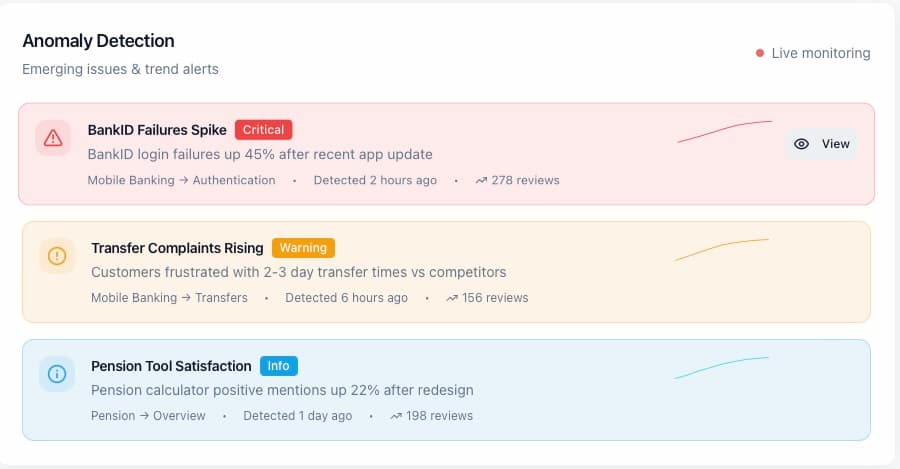
- BankID login failures+38% against its baselineRising
- Pension statement errorsDid not exist last weekNew
- Card delivery delaysRaised by 3 critical customersCritical
Rising, new, or critical.
Three kinds of alert. An issue whose mentions jump against its own baseline. A theme that did not exist last week. An issue raised by a customer flagged at critical churn risk.
- Baselines per issue, not one global threshold
- Emerging themes surfaced before they have a name in your dashboard
- Severity from the customers behind it, not the volume alone
Slack · #alerts-cx
BankID login failures up 38% this week: 1 280 mentions, 2.56M NOK at risk. Top driver: code expiry on iOS.
Microsoft Teams · Customer experience
Session timeout down 22% since the 3 Sept release. 118 customers who raised it have logged in again.
Email · Weekly report
5 issues carry 5.56M NOK at risk. Three are rising; one is new this week: pension statement errors.
Where the decision is made.
Alerts land in the Slack channel or Teams team you choose, or in the inbox as part of the weekly report. Each one names the issue, the size of the change, the channels it came from and the top driver.
- Slack, Microsoft Teams and email
- One alert per cause, not one per ticket
- Ask Compethic in the same thread for the detail
BankID login failures, up 38% this week
Login codes expire early on iOS since the 3.2 release. 1 280 mentions across App Store, support mail and calls. 2 560 000 NOK at risk; 61% of these customers hold a mortgage.
The cause in one line the team can use.
Behind every alert sits the classification: the issue, the pain point, the journey stage and the customers. The alert carries the one-line cause and the evidence, so the person who receives it can act without opening a dashboard.
- Top driver named, with the release or event it followed
- Quotes and counts attached
- Send it to Linear as a ticket in one click
What you get.
Always on
Analysis runs on the schedule you set, from hourly to daily. Every new batch is checked against the baselines.
Baselines per issue
A small issue that doubles is seen before a big one that drifts. Thresholds are relative to each issue's own history.
Critical-customer alerts
A customer at critical churn risk who writes in triggers an alert with their history, whatever the issue.
Slack and Microsoft Teams
Connect a channel once. Alerts and answers arrive where the team already is.
Weekly intelligence report
What changed, which issues are critical, which customers are at risk and what to do about it, every week.
Linear tickets
An alert becomes a ticket with the quotes, the counts and the revenue figure attached.
Everything Compethic does follows one loop.
Get the first alert this month.
Connect one channel and a Slack or Teams channel. The agent starts watching on the first run, and the first alert usually arrives within the week.
Fields marked * are required.